Skip to content

LegisGate · the written assessments

An assessment that opens with its regulatory parts written.

In LegisGate, the platform where you manage your inventory of AI use cases (each one a tool used for one purpose), assessments open with the regulatory parts completed. When the law calls for a data protection impact assessment (DPIA) or a state privacy assessment, it opens as a working page in your workspace. The regulatory parts are written and cited; the parts that need your judgment are marked as yours. A fundamental rights impact assessment (FRIA) is identified the same way and prepared once its official template is published.

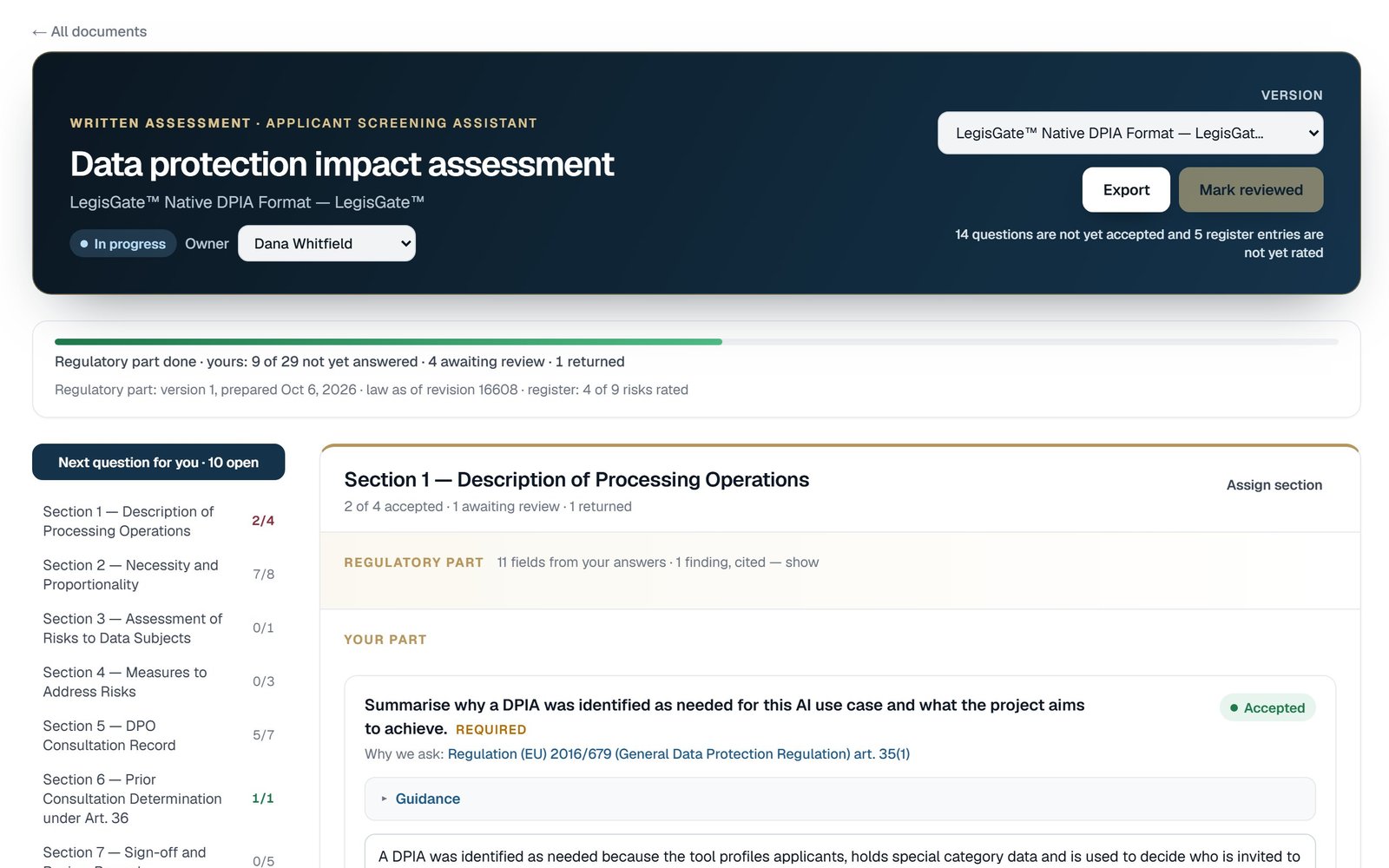
A data protection impact assessment open in LegisGate, with its Regulatory part above the questions in Your part
Included
With the AI use case that calls for it
The assessments
DPIA · FRIA · state privacy assessments
Monitoring
Included and automatic

Who does what

LegisGate writes the regulatory parts. You write yours.

An assessment needs the regulatory parts, facts from the people who hold them, and judgment. LegisGate completes the regulatory parts and routes each question to the person who can answer.

AssessmentStatutory basisRegulatory partYour part
DPIAGDPR Art. 35 Processing description, applicable obligations, cited risk framing, regulator context Necessity and proportionality, your rating of each risk, the review
FRIAEU AI Act Art. 27 Now: whether the article reaches the use case, with the cited obligations. The document itself follows once the official form is published Fundamental-rights judgment for your population and your use
Privacy risk assessment
called a data protection assessment under some states' statutes
US state privacy and data protection statutes The obligations for each state the use case reaches, the cited triggers, retention expectations, and the title that state's statute uses Weighing of benefits against harms, the safeguards your organization operates, your counsel's review

How it works

The law decides which assessment you need.

LegisGate works out the assessment an AI use case needs, and the jurisdictions it covers, from your answers. You do not choose from a list.

Step 01

Add the AI use case

Answer the dynamic intake form, a questionnaire that asks only what your earlier answers make relevant. The same answers feed the determination, the list of laws that apply to the use case, and every written assessment opened from it, so no question is asked twice.

Step 02

The determination names the assessments

It lists the written assessments the laws that apply call for. Where none is required, it records that, with the date.

Step 03

The drafts are already open

Each DPIA or state assessment the determination names opens as a draft on the use case, with the regulatory parts completed. You do not need to request it.

Your first five AI use cases are free, and each one includes the laws that apply, the obligations, the written assessments and monitoring. No payment card is required. From the sixth AI use case, plans start at $249 per month.

The working page

The assessment opens with its regulatory parts written.

A DPIA often arrives as an empty template. Here, each written assessment the use case’s laws call for opens as a draft when the determination runs. It is a working page on the use case, not a file sent to you, and nothing needs to be activated.

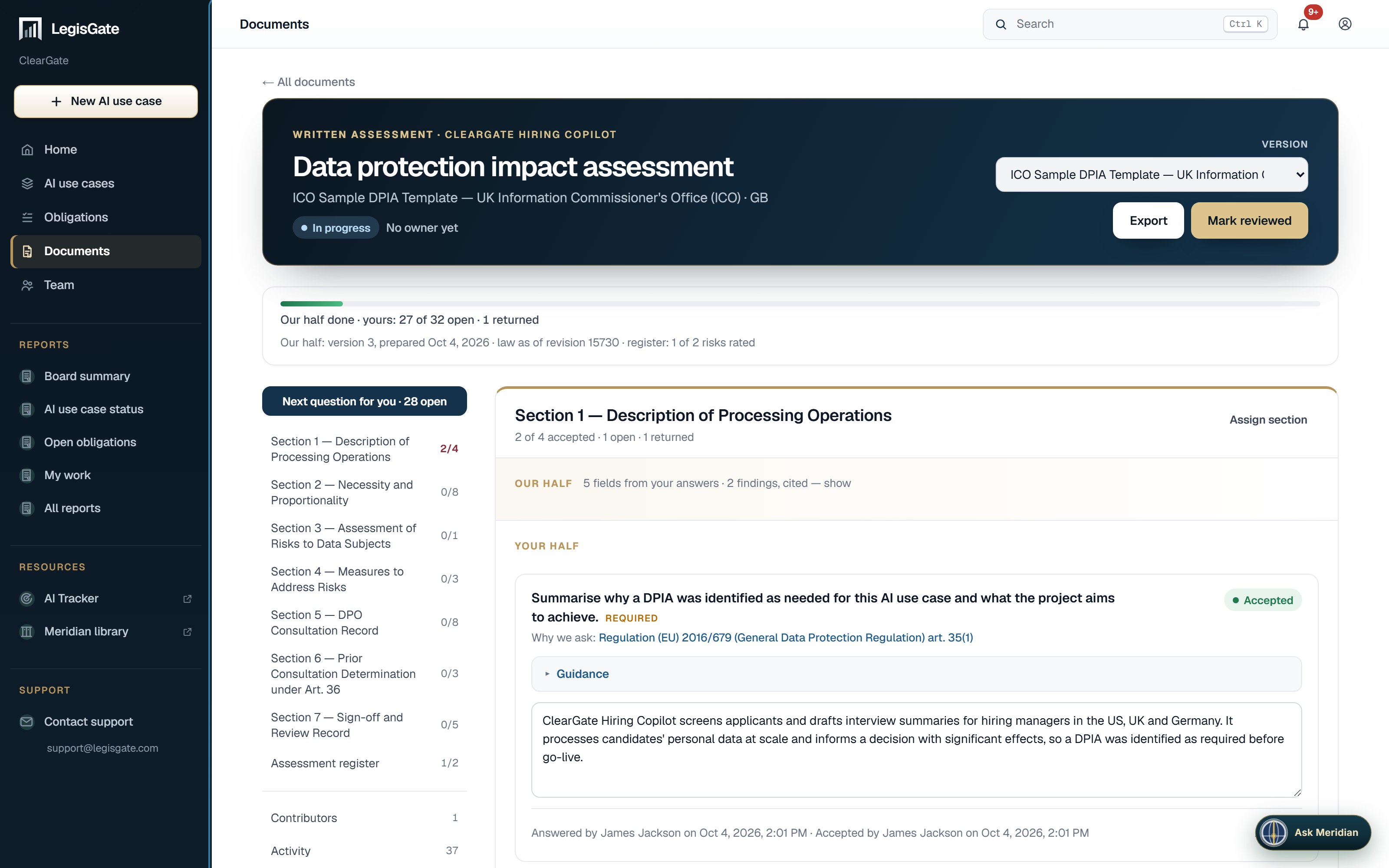
A DPIA open in the LegisGate platform: the version switcher and the Export and Mark reviewed buttons in the header, the sections down the side, and one section open with the Regulatory part summarised above the questions in Your part
01

Regulatory part

The regulatory content, already written and cited to the provision it comes from. It sits at the top of each section, folded to one line until you open it, and it is read-only. Its answers can be checked against a source, and LegisGate is responsible for keeping it accurate.

02

Your part

The part that depends on your organization. On the EU and UK DPIA and the California privacy risk assessment, it is a set of guided questions you answer on the page. Each answer is saved where you write it and carries a status: Open, Answered, In review, then Accepted, or Returned with a note.

03

Which assessments

A DPIA under the GDPR or the UK GDPR, and the privacy risk assessment a US state statute calls for, titled as that state titles it. LegisGate prepares the regulatory part of each state assessment automatically and marks the sections your organisation completes; guided questions are added state by state (California first).

04

A FRIA is listed as waiting

Where the EU AI Act calls for a fundamental rights impact assessment, it is listed as waiting for the official template. No document exists until the AI Office publishes its form. What the article asks for is already among the use case’s obligations.

We bring the regulatory intelligence and the intake. You bring the privacy and legal judgment for your use case and organization. The document is built to hold both.

What a written assessment is, and is not

The questions

Each question states why it is asked and can be assigned.

A blank template shows what to complete. It does not say why each field is asked, and it assumes one person holds every fact.

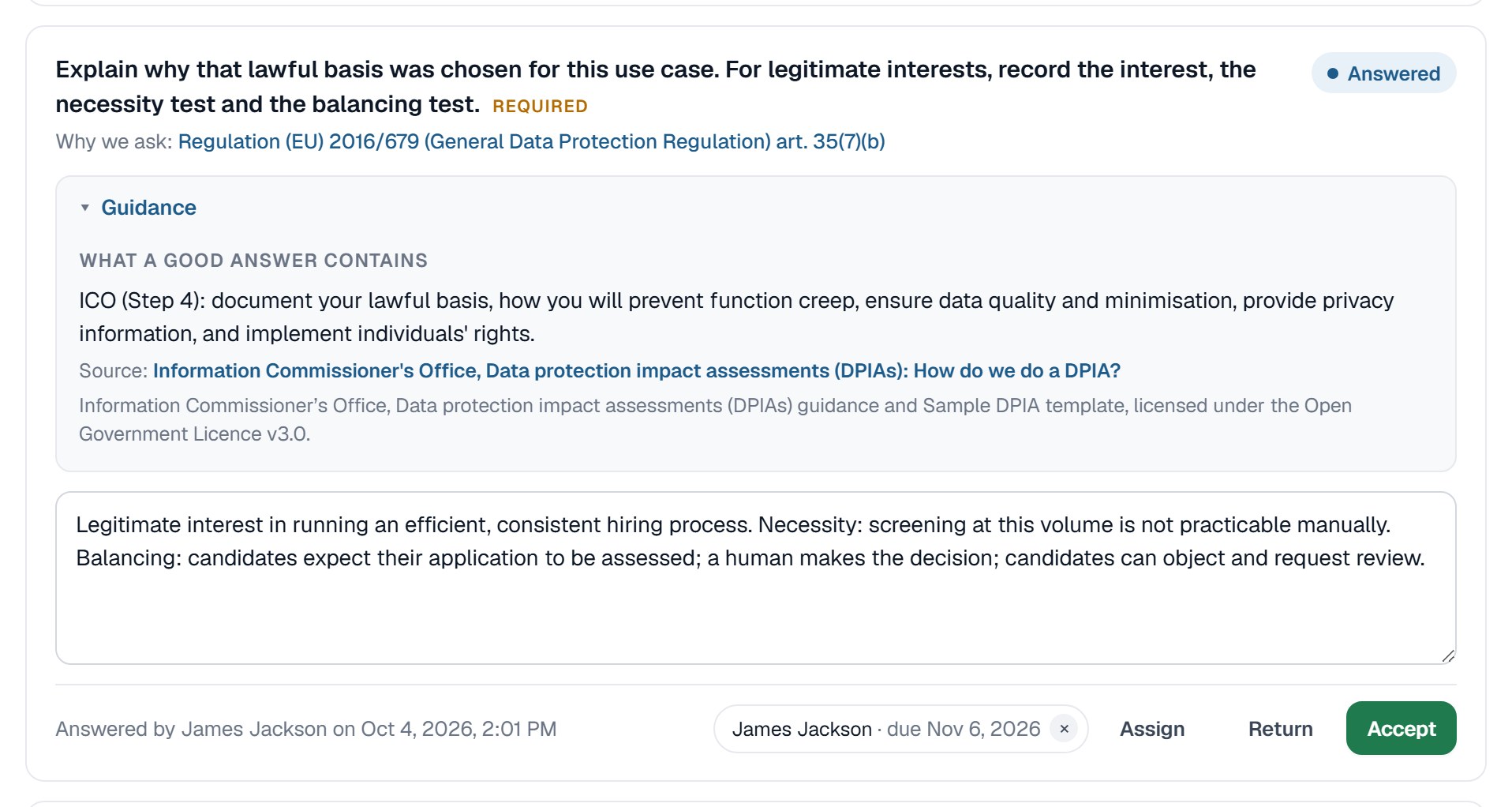
One question in a DPIA, opened to show the Why we ask line with the provision that requires it, and the Guidance block quoting the ICO with its license
Why we ask

The provision behind the question

Every guided question names the article or section that requires it and links to the source text.

Guidance

The regulator’s own text

A Guidance block quotes the regulator’s own text. On a DPIA it is the ICO’s DPIA guidance and sample template, shown with the license they are published under. On the California privacy risk assessment it is the California regulations. The text is quoted as published and is not presented as advice.

Assign

A question, or a whole section

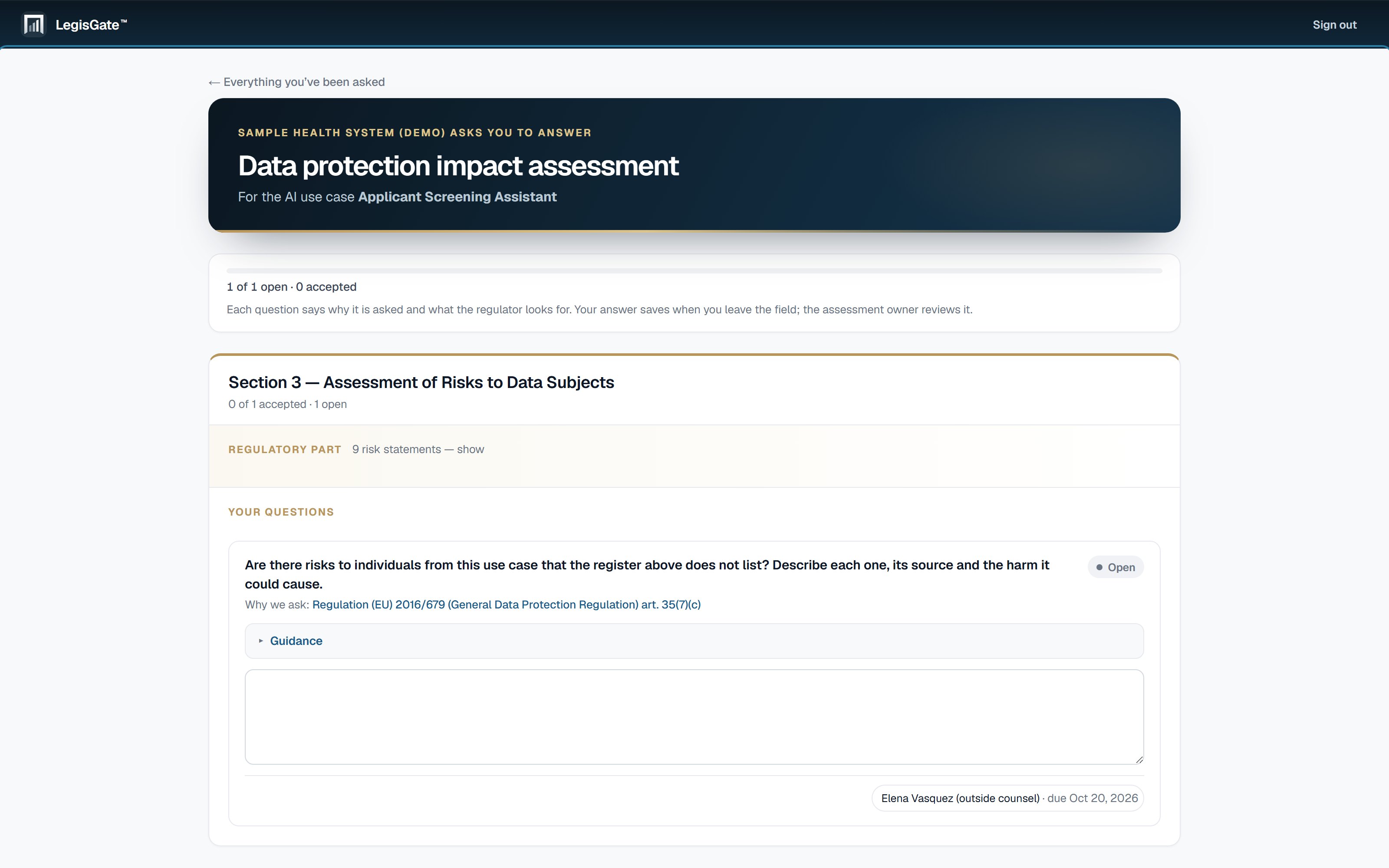
Assign a question or a section to a teammate with a due date, or invite a contributor by email. A contributor creates a password from the link and sees only the questions assigned to them. A contributor is not a member of your workspace.

What an invited contributor sees in LegisGate: the questions assigned to that person

The assessment register

The risks the determination raises, rated by their owners.

The assessment register is the list of risks and measures in the assessment. LegisGate identifies the risks from the laws that apply to the use case. How likely each risk is, and how serious for your people, is your organization’s judgment.

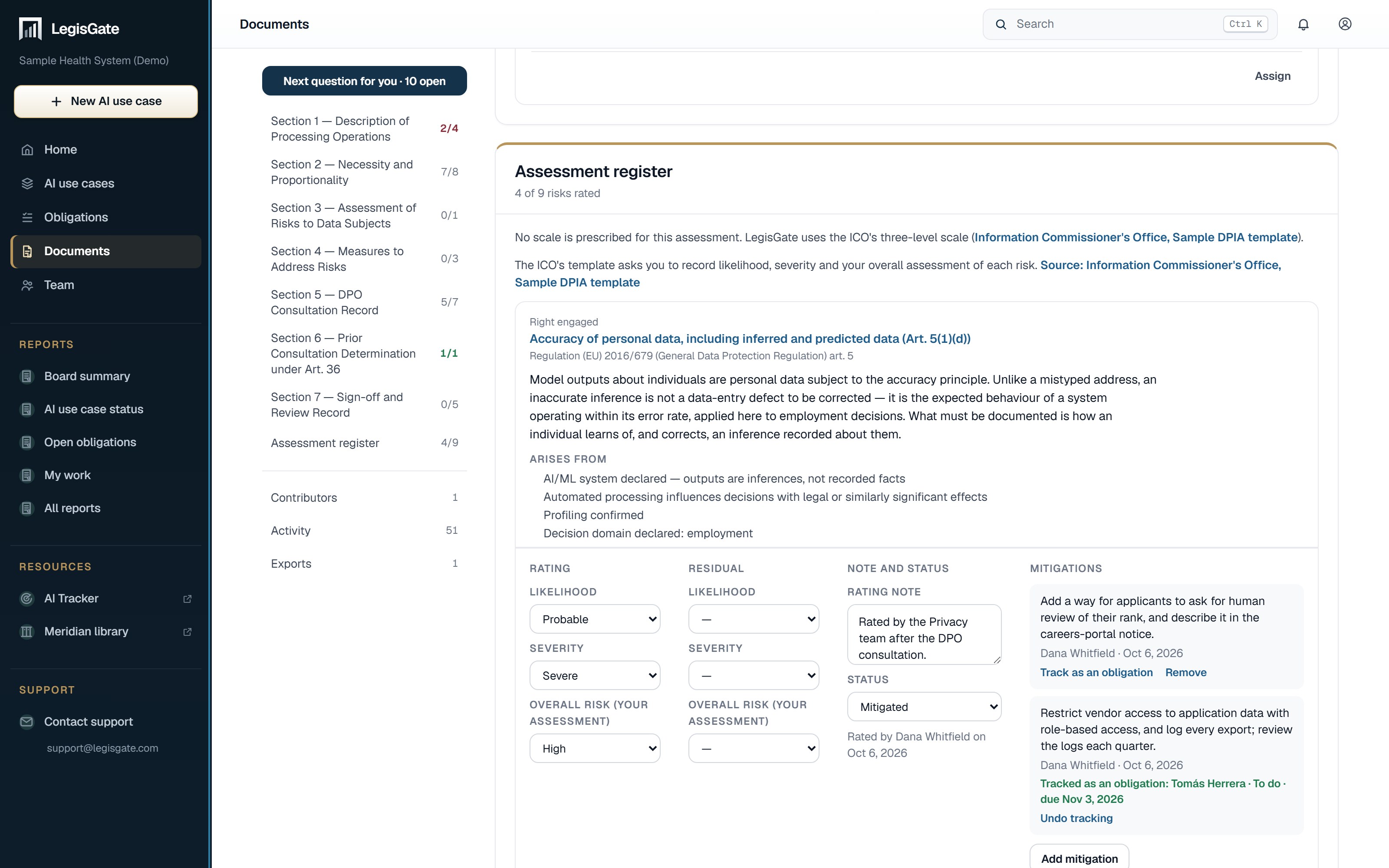
The assessment register in LegisGate: one risk from the determination, cited to GDPR art. 5, with the ICO scale for likelihood and severity, a residual rating, a rating note, and two mitigations, one of them tracked as an obligation
01

Your rating, on the regulator’s own scale

Where the version you are working to prescribes a scale, the register uses it, as the ICO’s sample template does. Where it prescribes none, the register says the scale is your organization’s own choice. LegisGate names each risk and cites its source. It does not rate the risk.

02

Before and after the measures

Each entry carries your rating, the measures against the risk, and the residual rating once those measures are in place.

03

A measure you commit to becomes an obligation

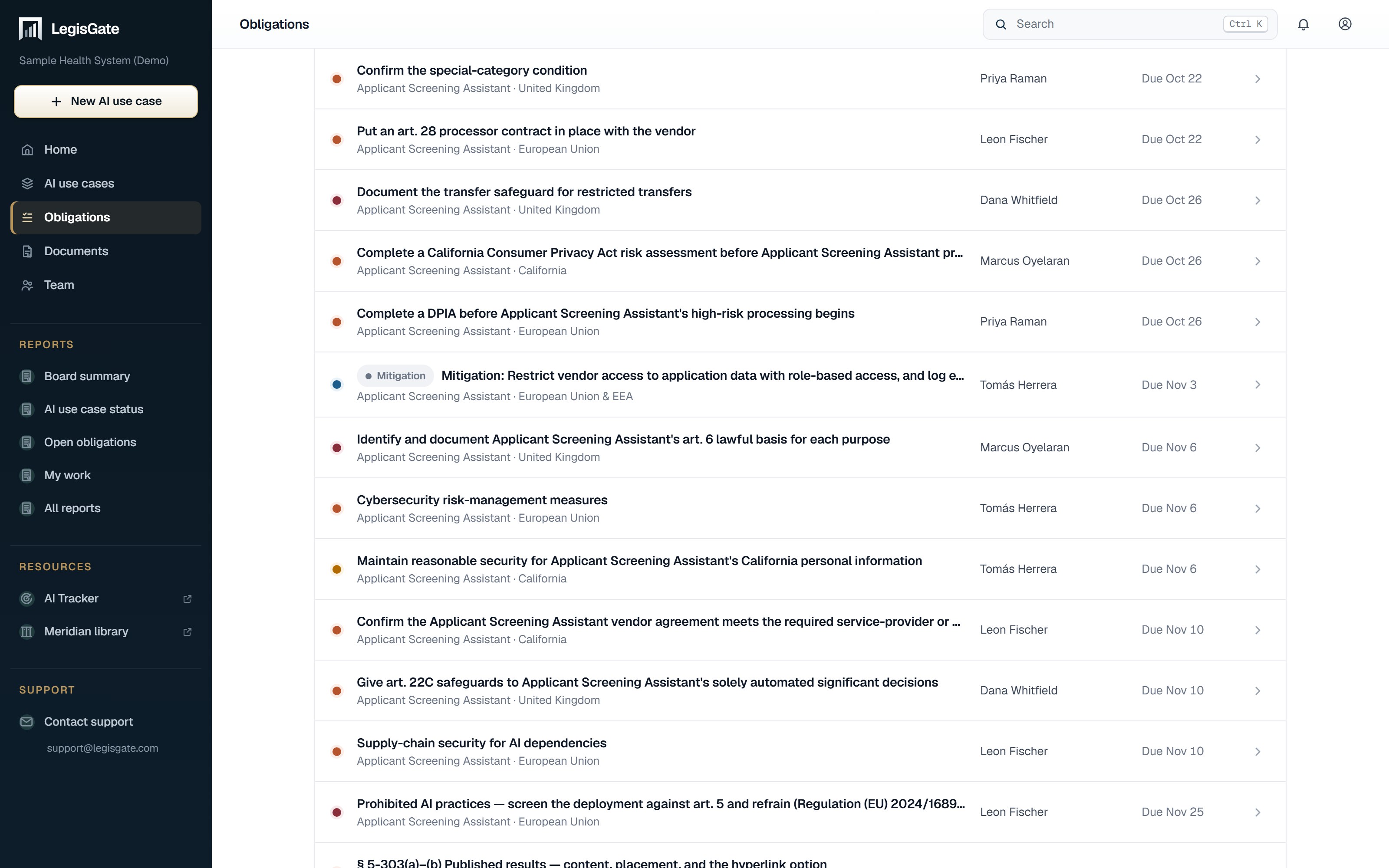
A mitigation becomes an obligation with an owner and an optional due date, and appears on the obligations board with the rest of the work.

04

On a DPIA, one set of answers and more than one version

A DPIA exports as a Word document in the ICO sample template, the EDPB template structure, CNIL and other versions. Your answers are saved once, so choosing another version does not mean answering again.

05

An export states its progress

You can export at any point. The cover of a DPIA or state assessment export carries a status line: how many questions are accepted, how many register entries are rated, and whether the assessment has been reviewed, by whom and when.

06

Mark reviewed is a record of review

Marking an assessment reviewed records who reviewed it and when. It does not say the assessment is sufficient. Your counsel decides sufficiency.

The obligations list in LegisGate filtered to one mitigation from an assessment register, shown as an obligation with an owner and a due date

What this is not. LegisGate produces regulatory intelligence and assessment-preparation materials. Nothing we produce is legal advice, a legal opinion, a certification, or a determination of compliance, and no assessment prepared here meets the obligations of Art. 35, Art. 27 or a state assessment statute on its own. Your counsel determines sufficiency.

Format status

Where each template stands.

A document that claims an official status it does not have can be relied on in error. Each status is stated here.

Published

ICO sample DPIA template

The ICO publishes DPIA guidance and a sample template. The guidance sits beside the questions, and a DPIA exports as a Word document in the sample template.

Not yet final

EDPB harmonised DPIA

The EDPB’s harmonised template (version 1.0, adopted 10 March 2026 for consultation) is not yet final. A DPIA exports in its structure as a working document. Nothing here is an official EDPB assessment or score.

Not yet published

AI Office FRIA form

Until it is published, LegisGate lists a FRIA as waiting for the official template and puts what Art. 27 asks for among the use case’s obligations. It does not present any document as the official form.

After it is written

The law can change after the document is written.

A determination reflects the law on the day it is made, and an assessment records a legal position at a point in time. Legal positions change, and a document does not show when it has stopped being current. Monitoring is included with every AI use case and runs automatically.

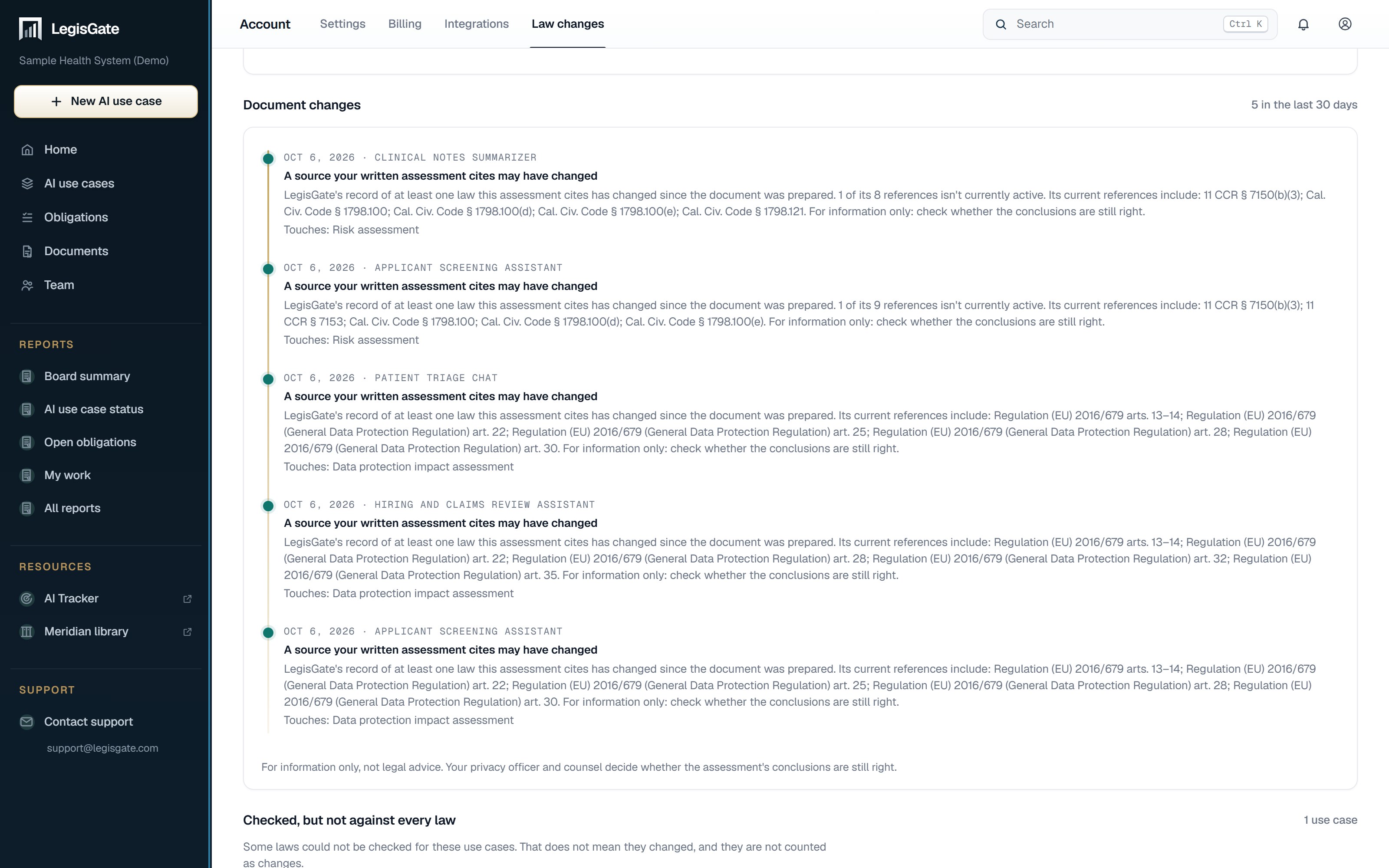
The Document changes list in LegisGate: five changes, each dated, naming the AI use case and the assessment it touches, with the references the assessment cites
01

Which use cases a change touches

When the law behind a use case or one of its assessments changes, you are told which use case and which assessment it touches. The notice names your affected use cases. It is not a general update about the law.

02

The question it belongs to

When the law behind a question changes, LegisGate flags that question.

03

A record of who did what

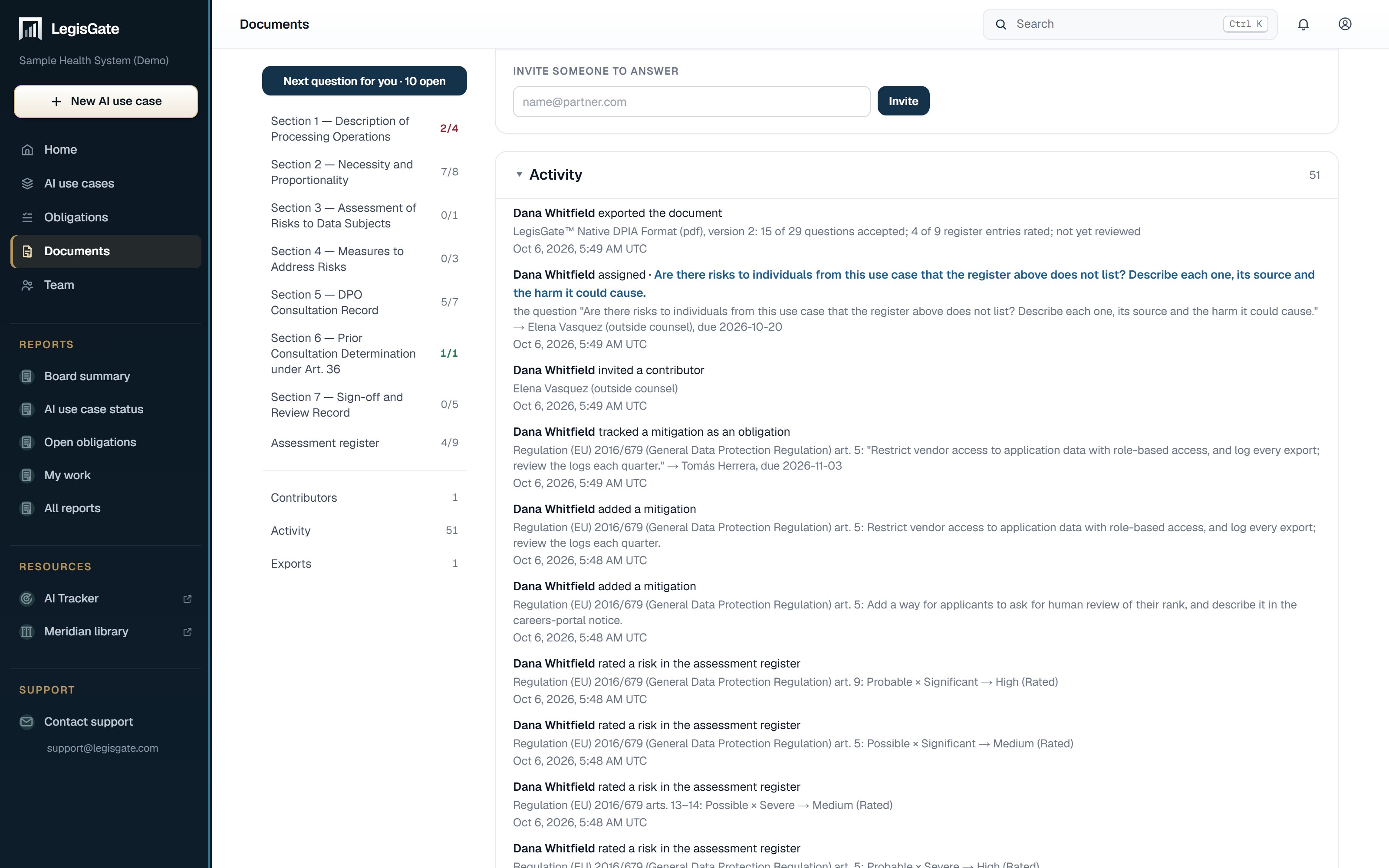
The activity log on each assessment records who answered, who accepted, who assigned and who exported, and when.

The activity log of a data protection impact assessment (DPIA) in LegisGate: who exported, assigned, invited, tracked a mitigation and rated a risk, each entry dated

What monitoring does not do. It monitors the law. It does not rewrite your answers, and it does not monitor your organization or your vendor. A change to the AI use case itself is something you tell LegisGate. This limit is stated so that nobody assumes it is covered.

Begin with the AI use case

An assessment begins with knowing which laws apply.

Add the use case to your inventory and read the determination. The DPIA or state assessment it calls for is already open in your workspace. Your first five AI use cases are free, with the written assessments included.

Talk to usWe're here to help
The Written Assessments — DPIA, UK DPIA, FRIA and State Privacy Risk Assessments | LegisGate